Last updated: August 11, 2026
- That’s the first question a student loan payoff calculator answers.
- This student loan payoff calculator article is for you.
- For plan-specific details, loan servicer support and official student aid guidance are better than guessing.
- If your loan is federal, studentaid.gov is the best starting point.
Quick answer: In seconds, a student loan payoff calculator can show how long repayment may take and how much interest you could end up paying. For the student loan payoff calculator: estimate total cost time pay off process, a small extra payment can trim months or even years from the schedule, but the result is still only an estimate. Handy. Not exact.
Key facts
– A payoff calculator estimates payoff time and total cost, not a guaranteed date.
– It is most useful when you compare at least two payment scenarios.
– Extra principal payments can reduce interest, but the effect depends on rate and balance.
– Federal, private, and country-specific loan rules can change how payments are applied.
– If terms are unclear, check your servicer, loan documents, or a qualified adviser.
How long will the debt hang around? That’s the first question a student loan payoff calculator answers. The second is harsher: how much interest may pile up before the balance hits zero. I write about personal finance, and this is information only, not financial advice; for your own situation, I’d talk with a qualified adviser or loan servicer because loan terms and rules vary by country and can change.
Staring at a monthly bill and thinking, “What if I pay more?” You’re not alone. This student loan payoff calculator article is for you. The short answer is simple: use a payoff calculator to compare scenarios, not just to pull one payoff date out of thin air. The real value is seeing how extra payments, different rates, and changed payment schedules affect both time and total cost.
What a Student Loan Payoff Calculator Actually Shows
A good student loan payoff calculator answers a practical question: if I keep paying this amount, when will the balance hit zero, and what will I have paid in total? The monthly bill alone can be misleading. A loan that feels manageable each month can still chew through a lot of cash over time if interest keeps stacking up.
Four inputs usually drive the result: current balance, interest rate, minimum monthly payment, and any extra payment you want to test. From there, it estimates the payoff timeline and the total amount paid. Some calculators also let you compare lump-sum payments, biweekly payments, or a one-time increase after a raise. Useful stuff. Small changes can shave off months or years, depending on the loan size and rate.
Accuracy is the catch. When your rate is variable, payments are paused, or your servicer applies payments in an unexpected order, the answer can shift. Federal student loan programs, private loans, and country-specific loan systems all work differently, so I’d treat any calculator as a planning tool, not a promise; check the rules with your servicer or a qualified adviser. The U.S. Department of Education’s Federal Student Aid pages and the Consumer Financial Protection Bureau are good starting points for U.S. borrowers.
For a plain-language explanation of federal loan repayment rules, I’d also look at the U.S. Department of Education’s Federal Student Aid pages and, for debt math basics, the Consumer Financial Protection Bureau’s student loan guidance. Those are solid starting points because they explain how interest, repayment plans, and servicer behavior affect your balance. Straightforward. No fluff.
The Real Difference Between a Payoff Calculator and a Simple Monthly Budget

A student loan payoff calculator beats a basic budget spreadsheet when the real question is, “How long until this debt is gone?” A budget can tell you whether the payment fits your cash flow. The calculator shows the hidden cost of time.
That difference matters. A budget says, “I can afford $250 a month.” A payoff calculator says, “At that payment, this loan may take many years longer to clear, and interest may make the total cost much higher than the original balance.” That second answer is usually the one borrowers actually need.
Generic budgets also miss loan mechanics. They may show one line item for student debt, but they usually do not model interest accrual, extra principal payments, or what happens when you round payments up. A payoff calculator does. So it’s better for deciding whether extra money should go toward debt, savings, or another goal.
The downside? Calculators can create false confidence if you treat the output as exact. I’d double-check assumptions with your servicer or a financial professional. They are best for comparing scenarios, not for predicting your life to the month. When your income is unstable, when you expect a refinance, or when you may qualify for forgiveness or a special repayment program, the timeline can shift.
Student Loan Payoff Calculator: Who Should Actually Use This (and Who Shouldn’t)
Borrowers who already know their monthly payment and want to test the effect of paying more get the most from a payoff calculator. That includes people with stable income, borrowers deciding between debt payoff and other goals, and anyone trying to see whether a small monthly increase can save time. It is also useful when you have multiple loans and want to compare which one disappears first.
Not so fast if you do not yet know your loan terms. Missing the interest rate, repayment type, or whether your loan is federal or private makes the result too rough to guide a decision. I would not use the calculator as a substitute for reading your promissory note or checking your servicer account.
Clarity is the strength here. The tool can show, in plain terms, how extra principal payments change the end date. That makes it easier to choose a payoff strategy that fits your cash flow. But there’s a trade-off: the tool can tempt you to assume every dollar beyond the minimum should go to loans. That is not always the right call if you have high-interest consumer debt, no emergency fund, or an income that swings month to month.
If you want to understand the repayment math without committing to a plan, this is the better starting point. If you need help deciding between debt payoff, savings, or another goal, the calculator alone is too narrow.
The Honest Side-by-Side
| Criteria | Payoff Calculator | Basic Budget Worksheet | Winner for this condition |
|---|---|---|---|
| Shows payoff date | Yes, usually estimated | No | Payoff Calculator |
| Shows total interest cost | Usually yes | Usually no | Payoff Calculator |
| Helps you see if a higher payment changes the timeline | Yes | Only indirectly | Payoff Calculator |
| Useful for monthly cash-flow planning | Somewhat | Yes | Basic Budget Worksheet |
| Shows impact of interest accrual | Yes | Usually no | Payoff Calculator |
| Works well when loan terms are uncertain | No | Somewhat | Basic Budget Worksheet |
| Best for comparing extra-payment scenarios | Yes | No | Payoff Calculator |
| Helps decide between debt and other goals | Partly | Partly | Tie |
The table makes the trade-off plain: the payoff calculator is the stronger decision tool for debt reduction, while a budget sheet is better for overall money management. If your only question is “How fast can I kill this loan?” the calculator wins clearly. If your question is “How do I manage everything I owe and spend?” the budget is more useful.
A generic article often blurs that line and treats every finance tool as interchangeable, but they are not. One is built for timelines and interest. The other is built for cash flow. Use the wrong one, and the answer looks cleaner than it is. If you want broader debt-planning help, see budgeting basics and debt repayment strategies.
Student Loan Payoff Calculator: The Specific Situations Where It Wins
The payoff calculator wins when you want to test a real choice, not just admire a number. When you’re deciding whether to add $25, $50, or more to your monthly payment, this tool shows the payoff-date difference in a way a normal budget cannot. That kind of concrete comparison helps people move.
It also wins when you have multiple loans with different rates. A calculator can help you see which balance is the most expensive over time, even when the smallest balance is not the costliest one. Loan size and loan cost are not the same thing. Not even close.
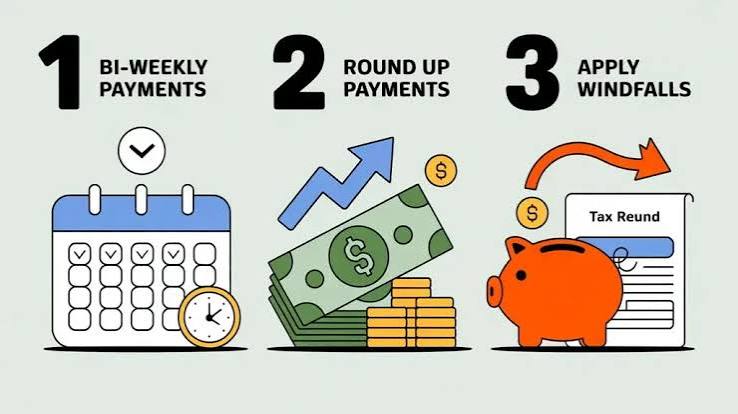
A windfall is another strong use case. A tax refund, bonus, or temporary side gig can be modeled as a lump-sum extra payment. The calculator can show how that one move might shave off future interest. I’d use it here because the trade-off is simple: more money toward principal now means less time paying interest later.
The weakness is certainty. Payoff calculators can overstate it. When your repayment plan is tied to income, forgiveness, deferment, or other program rules, the simple math may not fit your loan. In those cases, the calculator still helps as a rough model, but it should not be the only thing you rely on. For plan-specific details, loan servicer support and official student aid guidance are better than guessing.
The Honest Side-by-Side
If you are choosing between two ways to think about your debt, I’d put it this way: the student loan payoff calculator answers “how long and how much,” while a broader debt worksheet answers “what else is happening in my money life.” The calculator wins on precision for loan payoff. The worksheet wins on context.
That makes the calculator especially useful for borrowers who already have a stable emergency fund and know their loan terms. It is less useful for someone who is still deciding whether they can afford extra payments at all. In that situation, a high-yield savings account may matter more than a faster payoff. Honestly, that trade-off is common.
Our Verdict: Which One to Choose and Why
Choose the student loan payoff calculator if you already know your loan details and want to test how extra payments change your payoff date and total cost. Choose a basic budget worksheet if your real problem is that you do not yet know whether you can afford to pay extra at all. Neither if your loan may be affected by income-driven repayment, forgiveness rules, deferment, or another program that could change the schedule materially.
That is the clean split. I would use the calculator first when the decision is “How aggressively should I pay this down?” I would use the budget first when the decision is “Can I spare the money without breaking my month?” If you’re weighing other debt too, compare it with credit card payoff options before you decide.
The reason I’m firm here is that the calculator gives a sharper answer. It turns vague debt anxiety into a concrete timeline. But that only helps if the loan terms are known and stable enough for the model to mean something. Otherwise, it’s just tidy-looking math.
When to Reconsider This Choice Entirely
There are a few cases where the calculator stops being the main event and becomes just one input among many.
First, when your income is unstable, I would reconsider aggressive payoff planning. A calculator can’t tell you whether next month’s paycheck will be enough to cover rent, food, and the loan. In that case, liquidity matters more than speed.
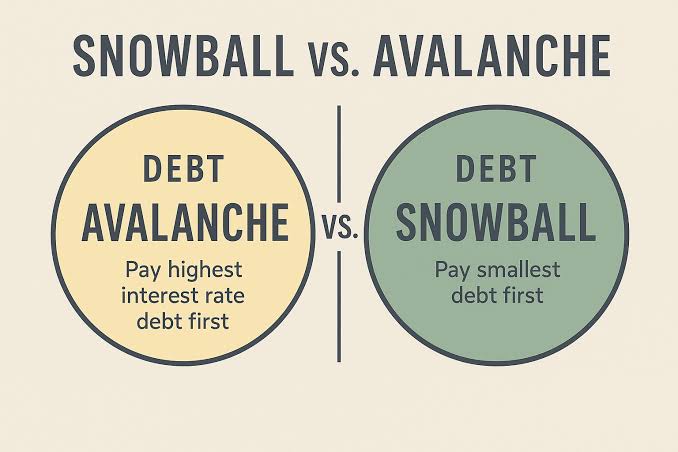
Second, if you’re carrying higher-interest consumer debt, the payoff calculator may still be useful, but the broader question shifts. You are no longer comparing only student debt versus extra student debt payments; you are comparing all of your obligations. A debt snowball vs. avalanche comparison may help.
Third, if your repayment plan includes forgiveness, public service rules, or income-based features, the simple “pay it off as fast as possible” model may not fit. The calculator can still estimate a scenario, but it should not drive the decision alone.
Fourth, if your loan has a variable rate, the estimated interest total may change over time. That is one more reason to treat the output as a planning estimate, not a locked-in forecast, and to confirm details with your servicer or a financial professional.
How to Use a Student Loan Payoff Calculator Without Fooling Yourself
Start with the exact balance, the current interest rate, and the required monthly payment. Then run at least two extra-payment scenarios: one modest and one more aggressive. The point is not to find a perfect number. The point is to see how sensitive the payoff date is to a change in payment.
Look at two outputs every time: total payoff time and total interest paid. People often fixate on the date and ignore the cost. That is a mistake. A shorter payoff period matters because it can reduce interest, but the size of that reduction depends on the rate and the size of the extra payment.
I would also check the fine print from your servicer or lender. Some loans apply extra payments in a way that does not shorten the term unless you direct the payment properly. Policies differ by country and by lender, so this is one place where reading the loan rules matters more than the calculator interface. If your loan is federal, studentaid.gov is the best starting point.
For authoritative background, I would look at the U.S. Consumer Financial Protection Bureau’s student loan resources and your local government’s student aid or consumer finance site. If you are outside the U.S., use your national student loan authority, because repayment rules are not universal. Simple as that.
FAQ
How accurate is a student loan payoff calculator?
It is accurate only to the extent that your inputs are accurate and your loan terms stay stable. Variable rates, missed payments, and special repayment rules can change the result.
Does making extra payments always help?
Extra payments usually reduce principal faster, which can lower total interest and shorten the payoff timeline. But the right choice depends on your other obligations, emergency savings, and the terms of your loan.
Should I use a calculator before refinancing?
Yes, but only as part of a larger comparison. A refinance can change your rate, term, and protections, so the calculator should be used to compare scenarios, not to make the decision by itself.
Can I use this if I have federal student loans?
Yes. A payoff calculator can still estimate a timeline, but federal repayment programs and forgiveness options can change what “payoff” means in practice.
What information do I need before I start?
You need your current balance, interest rate, minimum monthly payment, and any extra amount you’re thinking about paying. When you have multiple loans, gather each one separately.